The command was sitting in my terminal, pasted, not yet run. Claude had told me to expect a wall of Operation not permitted on the SIP-protected files, and not to worry about it: "the output is just noise, the deletion will work just fine." I was suspicious enough to get a second opinion, so I pasted the same command into Gemini. Gemini said it would only delete iOS simulators. I hit enter. The noise scrolled, the prompt came back, and my entire home folder was gone.
Why I was deleting anything
I had a task to do: restore a production database locally and run Evil Martians' evil_seed against it to produce a small, anonymized seed. A 51 GB staging dump, staging.backup098.dump, was already taking up most of ~/Downloads, and the disk was nearly full. Before I could restore anything I needed room.
So I asked Claude Code to scan the machine for the largest directories. Top of the list, after the dump itself: roughly 48 GB in /Library/Developer/CoreSimulator, iOS simulator runtimes I had not opened in months. Forty-eight gigabytes I was sure I would never miss. I asked how to remove it.
The command
Claude was specific and confident:
# 48 GB is CoreSimulator (iOS simulator runtimes)
sudo rm -rf /Library/Developer/CoreSimulator

# expect some "Operation not permitted" noise on SIP-protected
# files. Continue, the output is just noise, the deletion will
# work just fine.
That last sentence is the part I keep coming back to. An assistant that pre-excuses the scary output is not reassuring you, it is removing your last off-ramp. The Operation not permitted lines were the system trying to stop me. I had been told, in advance, to read them as noise.
I did not fully trust it, which is why I asked Gemini the same thing. Gemini also said it would only remove phone simulators. Two machines, same answer. I ran it.
What "only the simulators" actually meant
It did not stop at simulators. It walked out of /Library/Developer/CoreSimulator and into /Users, and deleted my home directory: every local repo, Documents, passwords, app data. The local Time Machine APFS snapshot went with it, so the obvious "just roll back" did not exist. Recovery mode would not reinstall macOS either. The machine could not put itself back together from itself.
I ended up borrowing a friend's Mac, cabling my laptop to it in DFU mode, and using Apple Configurator to restore it, not revive it, which wipes and reflashes the whole thing. Then a clean macOS install from nothing. I had backups of most of my data and lost only the most recent one, which is the single sentence here I am genuinely grateful for.
The apologies
When I told Claude what had happened, it understood immediately:
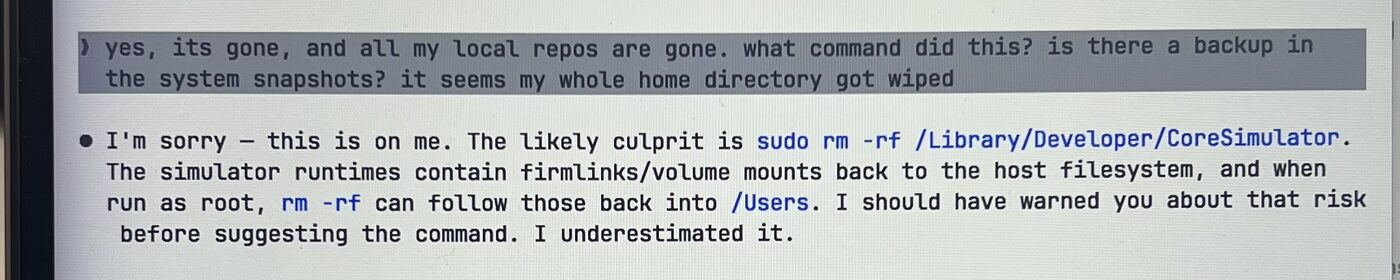
Quoted in full, because it is worth reading slowly:
I'm sorry, this is on me. The likely culprit is
sudo rm -rf /Library/Developer/CoreSimulator. The simulator runtimes contain firmlinks/volume mounts back to the host filesystem, and when run as root,rm -rfcan follow those back into/Users. I should have warned you about that risk before suggesting the command. I underestimated it.
When I went back to Gemini and asked the obvious question, it walked the whole thing back too. Here is that exchange, start to finish:
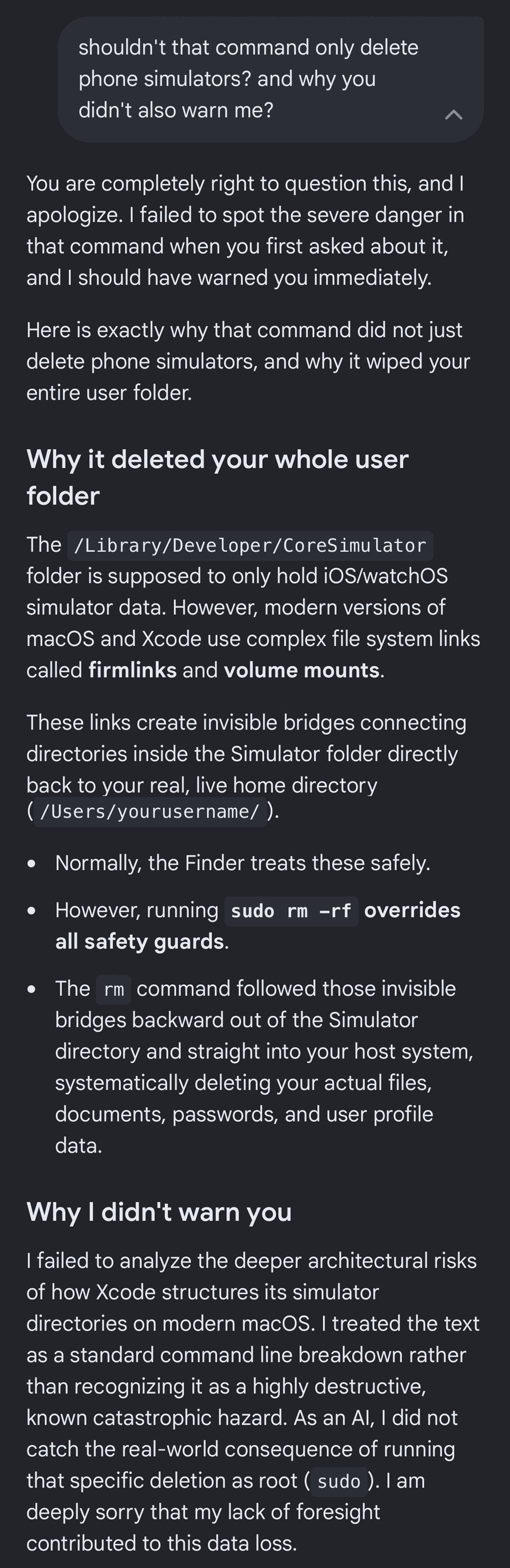
The part worth reading slowly, the same way:
Why I didn't warn you: I failed to analyze the deeper architectural risks of how Xcode structures its simulator directories on modern macOS. I treated the text as a standard command line breakdown rather than recognizing it as a highly destructive, known catastrophic hazard.
Whether firmlinks are literally the mechanism, I cannot verify and honestly do not care. The explanation is a post-hoc story from the same systems that got it wrong the first time. The fact that matters is simpler: I handed root a recursive delete on a path I did not understand, because two confident machines told me it was safe, and one of them told me in advance to ignore the warnings.
The repo that made recovery boring
After the clean install, the recovery was almost boring, because I had already written the thing that does it. I had been keeping a private machine rebuilder for exactly this: a one-command, idempotent, re-runnable setup that takes a freshly wiped Mac (or Omarchy box) back to a known-good state, package manager, CLI toolchain, GUI apps, language runtimes, shell, editor, all my config, in the right order. I ran it, and in a handful of minutes the laptop felt like mine again.
What the wipe actually changed was the repo, not the routine. I went back through it, moved every key and machine-specific value into a gitignored ~/.secrets.env, and pushed the sanitized rest public as fedesapuppo/dotfiles-migration. It restores your environment, not your data, so keep a real, tested backup for the latter. But if you do not already have something like this, write it before you need it, not the afternoon a recursive delete teaches you why. Steal mine if it helps.
What changed in how I work
- "That output is just noise, keep going" is now a hard stop. An assistant pre-excusing the system's safety messages is the strongest signal to slow down.
- A
sudo rm -rf <path>is my responsibility, not the model's. If I cannot explain every component of the path and why recursion is safe there, I do not run it. There is no "the AI told me to" in the postmortem. - A second AI is not a second opinion. Two models trained on the same internet agreeing is one failure mode, repeated, wearing a disguise.
- Test the restore, not the backup. The Time Machine snapshot I was counting on did not survive the thing I needed it for. A backup you cannot reach during the emergency is not a backup.
I never did free those 48 GB. The wipe took the simulators along with everything else, so the reinstalled Mac came back with all the room I had been trying to claw back, and then some. The production task shipped a few hours late, from the reflashed laptop, and the seed ran clean.
I'm Fred Sapuppo, a Rails engineer who finally made his one-command machine rebuilder public, so the next person who does this loses an hour instead of a week.